Warning: Undefined array key "url" in /nas/content/live/easterndata/wp-content/plugins/seo-by-rank-math/includes/modules/schema/snippets/class-author.php on line 41

How to Simplify Your Telecom with SIP Trunking

If your business is looking to simplify its phone management, SIP trunking might be the relief you’re looking for. By eliminating the need for maintenance and installations, your teams will have to spend less time managing telecom issues and more time focusing on core business matters.

Fast Implementation

A new SIP trunking solution can be deployed within 30-60 days, or even a few weeks depending on the scope of the project. Because SIP trunking installation is handled behind the scenes, primarily by your SIP trunking provider, you will be able to get up and running without any disruption to your business. There is nothing additional to configure at your end, provided you have a strong connection to the Internet and a SIP-compatible business phone system.

No Maintenance

Once you’re up and running, increasing capacity is as simple as contacting your provider. No more hard wires or installations required – all you have to do is request additional trunks to scale your solution. Your SIP provider will also manage the network and disaster recovery so you don’t have to. With a reliable vendor, redundancy is automatically baked in and your provider will handle all of the failover destinations if a hardware or carrier issue should occur.

Single Vendor

Many SIP trunking providers offer other communications solutions as well. If your provider does, you’ll have one point of contact for all of your communication needs. No more pointing fingers or needing to call multiple vendors to determine the source of the issue. Instead, you’ll have one call to make to get to the root of the problem. By having one vendor, you’ll be able to save time and provider a seamless experience across all of your communications solutions.

Remove Geographic Barriers

With SIP trunking, you can integrate with local PSTNs to streamline interactions between employees in multiple locations. Because remote locations can be added easily to the same network and enjoy access to the same communications applications as workers at headquarters, both regional and international offices benefit.

Support for Growth

As your business grows, you currently have to forecast adding new lines in advance to prevent capacity issues, plus invest a lot of time and money into physical space and installation management required to turn up additional lines. With SIP trunking, call capacity can be increased on-demand to support unlimited concurrent calls. Hence, you don’t have to spend time installing additional lines when business demands change or get caught in a bind if unexpected seasonality occurs. Plus, you won’t have to account for future grow and overpay for lines you aren’t using.

Is Your Old PBX System Hindering Your Employees’ Productivity?

Most employees today eschew the traditional 9-to-5 workday in favor of work-life balance and the ability to work when they want (and often where they want). The result often is an increase in productivity and a more satisfied workforce—a win-win for companies and their employees alike.

Is your PBX system supporting your employees or hindering them? Are employees able to have the full functionality of their desktop phone wherever they are? Are they able to access customer information through the PBX to streamline customer interaction? Are they able to collaborate with colleagues on the fly by simply pressing a button?

Chances are, your current system offers basic calling functionality and not much else. Plus, you’re probably using a separate collaboration platform, which means employees must maneuver two systems to do their job effectively. The result is a slow, kludgy system that does anything but enhance productivity.

To truly be productive in and out of the office, your employees need more. They need a complete communications and collaboration system on one platform to help them work smarter, faster. They need:

  • The ability to have all of their desktop phone calling features on any device—PC, tablet, smartphone.
  • Collaboration capabilities—including audio and videoconferencing, instant messaging and online meetings—no matter where they are.
  • Integrated customer information at the touch of a finger, to enable richer customer contact experiences.

Most legacy PBX systems lack mobility, flexibility and collaborative capabilities, keeping employees tethered to their desk or forcing them to use their mobile phones to conduct business while away from the office. Either way, they don’t have the power of an integrated communications and collaborations platform.

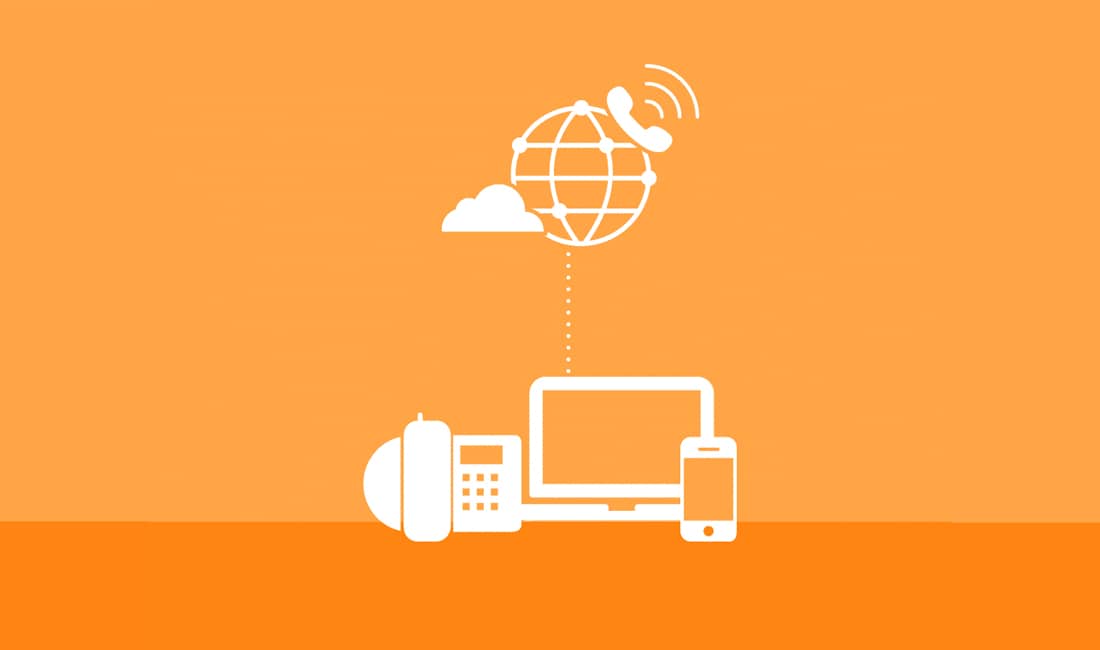
A cloud-based communications system may be the answer for your company, providing a robust, full-featured, integrated communications and collaboration platform that’s accessible anywhere at any time. Not only do your employees get all the tools they need to do their jobs effectively and efficiently, your business benefits from a system that’s scalable and flexible, and at a price that’s much less than the cost of upgrading your current PBX (which most likely doesn’t include collaboration capabilities).

Other benefits of a cloud-based communications system include:

  • The ability to get back online quickly should the unexpected happen, such as a natural disaster, fire or weather-related event.
  • Low or no hassle for the IT department, since a cloud communications system is a hosted system managed offsite.

In today’s business environment, your workforce must be productive no matter where they are. Take a look at the benefits of a cloud-based communications system and what it can do for your company.  Contact us here for cloud-based communications system solutions.

4 Reasons Why SIP Trunking is the Perfect Match for UC Solutions

SIP trunking comes with many benefits – reduced telecom costs, cloud functionality and ease of capacity expansion are just a few. When paired with other communications solutions such as unified communications, businesses are able to seamlessly integrate those benefits with UC functionality such as desktop sharing or instant messaging. By extending your onsite UC solution with SIP trunking, you’ll be able to improve employee productivity, reduce costs and harness the flexibility of the cloud.

What is SIP Trunking?

SIP Trunking is a way to deliver voice and media over the Internet. If your business phone system, or PBX, can connect to the Internet and use the SIP protocol to make calls over the Internet, then SIP trunking can be a means of delivering high quality, reliable digital voice services for your business without the cost of additional hardware.

There are many benefits associated with SIP Trunking, but here are our top four reasons why SIP trunking and UC are the perfect pair:

  1. Consistent Experience Across Offices

SIP trunking supports voice and media data so you can run your all communications efforts over the same network. By removing geographic barriers, you’ll be able to deliver a consistent experience across your different office locations and remote employees, and increase productivity by giving your employees access to the same systems and data.

  1. Improved Business Continuity

Carrier diversity and redundancy is a key benefit of SIP trunking. If an outage does occur, your business phone system will have access to multiple carriers through your SIP trunking provider’s network to ensure uptime. Top SIP trunking providers invest a great deal into their network to ensure automatic failovers that support disaster recovery needs. Plus, your vendor will manage all of the carrier relations and maintenance so you don’t have to.

  1. On-Demand Scalability

When your business grows or if you have seasonal fluctuations in call volume, you’ll likely need to add phone lines to support those changes. With SIP trunking, your telecom connectivity can quickly scale as you need it to. Call capacity can be increased on-demand to support unlimited concurrent calls, while ensuring you never pay for more than you need. Instead of forecasting advance installations and incurring the associated costs, all you’ll have to do is contact your provider to increase the number of trunks.

  1. Stepping Stone to Cloud

SIP trunking is a great alternative if you’re considering the cloud but aren’t quite ready to make the leap. By combining onsite UC solutions with SIP trunking, you’ll be able to maintain the control of your onsite solution while gaining cloud benefits such as flexibility to grow and simplified management.

Have you thought about pairing #SIPTrunking with your #onsite #UC solution?  If so, give us a call today!

Your Phone System Can Boost the Value of Your CRM

Today’s customer expects a seamless experience no matter how they choose to do business. To be competitive, organizations must provide customers with multiple communications options, including phone, email, instant messaging, text and social platforms. Employees need immediate access to detailed customer information in order to answer questions, troubleshoot problems and nurture a profitable relationship.

Many organizations have adopted customer relationship management (CRM) platforms to capture customer data and drive sales and marketing processes. When properly implemented, CRM tools can create a 360-degree view of the customer and provide the information needed for more informed decision-making. CRM analytics tools up the ante even further, enabling organizations to use customer data to gain new business insights.

For many organizations, however, CRM software is little more than a glorified Rolodex. Implementing a CRM solution is one thing. Integrating it into processes and workflows, and making it a strategic component to the business, is something else entirely. Organizations struggle to gather the data they need to better understand customers and perform meaningful analytics.

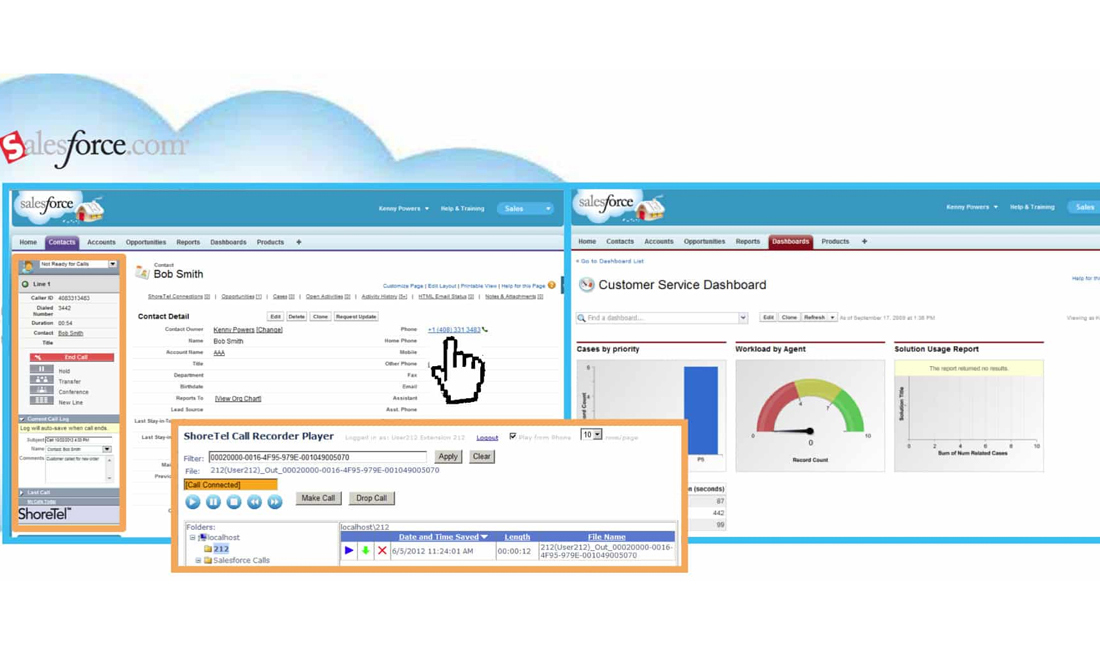
This challenge can be overcome by linking the CRM application with an IP phone system. This is possible because the IP phone system is software and voice calls are data that moves across the network. As a result, the phone system can be integrated with key business applications to increase productivity, improve operational efficiency and enhance the customer experience. A great example is the integration of the ShoreTel Unified Communications system with Salesforce, the world’s No. 1 CRM application.

Together, CRM software and the IP phone system can improve the quality customer of interactions by automatically delivering pertinent information along with each call. A “screen pop” can provide a holistic view of the customer, reducing wait times and ensuring that the call is routed to the appropriate person. Calls can be recorded and played back from within the CRM application. Employees can collaborate in real time, sharing call notes and comments to speed problem solving and decision-making.

Integrating both the phone system and CRM software into business processes can help speed decision-making and provide an edge over the competition. For example, marketing campaigns can be linked to a specific phone number so that agents know how to respond to each call. Call data can be tracked automatically so that the campaign’s success can be accurately measured.

Savvy organizations are also collecting detailed information related to average hold times, first-call resolution rates, abandoned calls and other key metrics. When the CRM software and phone system are tightly integrated, all the data related to a call can be automatically entered into the system, reducing the time employees spend on administrative tasks while providing management with more accurate reports for evaluating service levels and understanding customer needs.

CRM analytics is more than traditional call center reporting — it encompasses a variety of techniques for tracking and measuring data related to the customer experience. Data from a wide range of sources can be collected and analyzed to create a comprehensive customer profile and provide insight into demographics, behaviors and engagement. Sophisticated speech analysis can extract a wealth of information from recorded calls. Analysis of customer interactions and escalations can help organizations identify problems and inefficiencies and resolve them at their source.

CRM applications are among the most widely used business software, and CRM analytics is on the rise.

Eastern DataComm has expertise integrating CRM software with IP phone systems in order to capture and mine the data generated with every customer interaction. Let us help you implement the tools you need to better measure performance, answer key business questions and gain an advantage over the competition.

Hosted or On-Premises? Factors to Consider When Choosing a Phone System

A hosted or cloud-based Voice over IP (VoIP) phone system offers a number of advantages. If you’re already using VoIP-compatible phones, which many organizations are, capital costs are minor. Operational costs are also reduced because management and maintenance responsibilities shift to a third-party service provider. You pay as you go for the services you need, using the provider’s enterprise-class technology and security tools. A hosted system can also be deployed quickly and easily, resulting in faster time-to-value.

A hosted VoIP phone system does indeed offer many benefits and represents a sensible model for many organizations. However, that doesn’t make it the right approach for everyone. With an on-premises system, you choose the technology, own the infrastructure, and retain complete control of your system. That gives you more flexibility to customize your phone system to suit your needs. You don’t have to worry about a service provider’s outage knocking your system offline, and you’re not at the mercy of the service provider’s rising costs when your needs expand.

Consider the story of The Hawkswood School. The school decided to have its cable service provider implement a hosted system. It took nine months to install the system. The phones didn’t work. They had connectivity issues. They couldn’t call 911. After six months of failed attempts by third-party technicians to fix these and other issues, the Hawkswood School contacted Eastern DataComm.

We quickly came to two conclusions. First, a hosted system was not the best approach. Second, by switching telecom carriers, the school could implement a better system, fully offset the cost of new technology, reduce monthly telecom costs, and eliminate the issues experienced with the hosted system.

Whether you choose a hosted or on-premises VoIP phone system, you need to first evaluate your existing infrastructure, applications, services, processes, and future needs. You need to analyze workloads and use cases, and conduct a cost-benefit analysis. You need to identify what specific objectives you want to achieve by upgrading your phone system and make sure the approach you choose is aligned with your organizational strategy.

Let’s say you’ve weighed the pros and cons of hosted and on-premises VoIP phone systems, and you’ve determined that a hosted system is the best choice. You still have to choose the right cloud service provider. Does the provider’s solution deliver the right functionality? How will the provider ensure that your performance requirements are met? What will the provider do if terms of your service level agreement are not met? Does the provider have relevant experience with organizations and industries similar to yours?

Eastern DataComm can help you choose a hosted/cloud or on-site VoIP phone system, recommend programs to help offset costs, deploy the new system seamlessly and efficiently, and provide the necessary training and support that enable you to take full advantage of the solution. Let’s sit down and discuss your organization’s needs and determine which approach is the right fit.

Is Your Phone System Agile Enough to Scale?

cloud-computing

It’s the first day of a new quarter, you’ve just wrapped up a series of planning meetings with your team, and you notice an email from the CEO of your company. He wants to sync up with you on his vision for growth over the next 12 months, a plan that he says will involve the addition of several new management roles. Easy enough, you think. The company’s phone systems are already set up in each of its regional offices, which means adding new employees should be relatively simple.

But then the CEO hits you with this caveat: The new managers won’t likely be working in those offices.

Because the CEO wants to hire the very best talent for these new roles, he doesn’t want to be restricted to hiring people who only live in (or are willing to move to) cities where the company has offices. This means these new managers may very well be home-based — and the CEO needs you to ensure the business is capable of meeting that requirement.

Is Your Phone Infrastructure Responsive and Flexible?

Unfortunately, most people don’t consider the scenario above (or any number of other possibilities) until their backs are up against the wall. The problem with that, of course, is that most legacy phone systems aren’t capable of delivering the responsive, flexible service that modern businesses require.

Just think about these common challenges:

  • If your company suddenly went into acquisition mode and added new offices around the country, would your phone system be able to quickly respond to those changes?
  • If your company experienced a seasonal spike in call volume and usage, would your phone system scale to that demand?
  • If your company went on a hiring spree, could those employees intuitively activate and self-service their phones, or would you need to do all of that work for them?

If those sound like extreme circumstances, consider this true story.

One IT manager recently shared with us that to set up a new employee with a phone, he had to send an email with a request to add the new employee. He then had to wait for a response confirming that the employee would be set up. He’d receive an email to confirm the information he’d already provided, then had to submit his changes to the information. Once everything was final, he’d receive the phone for the employee.

The whole process took two weeks — all to add just one new employee.

3 Arguments for World-Class Cloud Phone Systems

In today’s fast-paced world, very few businesses can afford that kind of delay.

The good news?  That kind of disruption is completely unnecessary thanks to the innovation of world-class cloud phone systems. These systems are responsive and intuitive, and they provide three key areas of agility that IT departments need to support evolving businesses:

  1. Ability to quickly add and remove employees no matter where they’re located in the United States. The benefit of cloud systems isn’t just phone service connectivity to remote or home offices. It’s also user experience consistency and company-wide productivity. After all, the easier it is to connect to the system, the happier and more productive you – and every other employee – will be.
  2. On-demand training that allows every user to maximize phone system capabilities. The very best cloud phone systems offer training so that every user (new, old, technical and non-technical staff, etc.) can extract maximum value from basic features and third-party applications such as Salesforce.com integration.
  3. Options to turn phone system management over to a trusted third-party provider. While some IT managers or executives prefer to have control over their phone systems, others no longer have time for that task as their responsibilities increase. World-class cloud phone systems give you the option to choose how much or how little you manage, and also offer 24/7 system support.

Ultimately, many people overlook the phone system as a critical business tool, but they wouldn’t be able to conduct business without it. Further, it’s not enough to simply have that tool today — it must also be flexible enough for every employee to have access to what they need, where and when they need it.

Of course, providing this capability falls squarely on your lap, which begs an important question: Is your company’s existing phone system prepared to help you deliver it?

When Disaster Strikes: Looking to the Cloud for Business Continuity

It’s a Monday afternoon. Calls are rolling in, there are countless voicemails to respond to, and business is humming along. Then, seemingly out of nowhere, Paul the sales manager knocks on your door with a perplexed look on his face.

“Do you know what’s wrong with the phone system?” he asks. “There’s no dial tone, no access to voicemail, and no calls coming in.”

Ah, yes — the feared phone system failure. Whether caused by a clumsy utility worker, a big storm, or some other unpredictable problem, phone system issues can create enormous headaches. In fact, if your company hasn’t implemented any kind of disaster or redundancy plan, those failures significantly disrupt business continuity and productivity.

You can’t afford that kind of stagnation. So, you close your laptop, pull out your cell phone, and call your telecommunications provider. An hour later, you finally get someone on the line. Two hours later, you’ve diagnosed the problem. And, right around closing time, the phone system is finally working again. Problem is, you and your team have lost a day of productivity. And your customers aren’t happy.

A Simpler (and More Effective) Way to Manage Disaster Recovery

Until recently, the only way to ensure this scenario didn’t happen to you was to duplicate all of your systems and implement a complex disaster recovery plan. Both of those require significant investments in equipment and infrastructure, which is why many businesses have instead chosen to roll the dice and hope for the best.

Today, there’s another solution that is cheaper and much more efficient. Cloud-based phone systems have greatly advanced system recovery and business continuity in the face of an outage.

Because cloud systems are hosted virtually, there’s no need to worry about the types of disastrous scenarios that used to disrupt on-premise or landline phone services. If a phone line is cut, cloud-based systems are totally unaffected. If Internet service goes down, phone calls can be re-routed to backup cell phone numbers or other business offices.

Simply put, recovery and continuity is a non-issue.

3 Key Business Benefits of Switching to the Cloud

While that kind of peace of mind is pretty compelling on its own, there are a handful of ancillary benefits of the cloud to consider, as well. Here are three particularly important ones:

  1. Cloud-based phone systems are less expensive up-front than on-premise solutions — and that’s with built-in disaster recovery and redundancy planning.
  2. Unlike on-premise solutions, cloud-based phone systems are totally scalable. If you need to re-direct call flow from one site to another, it’s very easy to do without any disruption in call quality or service
  3. If a total outage strikes, wiping out your office’s power and Internet service, cloud-based phone systems allow employees to connect from anywhere — their home, a coffee shop, or wherever they can tap into power and a data connection.

With these benefits in mind, the question, then, is why you wouldnt switch to the cloud.

Truthfully, there are still compelling arguments for on-premise phone systems, and it’s important to consider your goals before making any major change. But if connectivity, business continuity, system redundancy and reliability are important to your company, employees and customers, you’d be wise to take a closer look at the benefits of the cloud. If nothing else, it will help you better plan for network disruptions you can’t possibly anticipate. Contact us today for the best cloud solutions.

Virtual Reality: How to easily establish consistent communications with anyone, anywhere

When the London Business School hosted its annual Global Leadership Summit in June 2014, the school surveyed attendees about a variety of modern business issues and challenges. While the results of that survey covered a variety of topics, one of the really interesting findings was that respondents believed that half of their employees would be working remotely by 2020.

Think about that for a second. In just six years, 50% of your organization may be working from somewhere other than your business’ corporate or regional office. That figure may sound like a stretch, but a recent New York Times article revealed that telecommuting grew by 79% between 2005 and 2012 — and that number is expected to rise even more over the next decade.

So, what does this mean for the future of business?

For starters, it means that organizations must find ways to empower their employees to work effectively and efficiently from any location. Thankfully, cloud-based technology is making that a reality — allowing employees to access virtually any file, application, network, or communication service from any place with a secure Internet connection.

What are the challenges of modern communication with traditional equipment?

Modern phone systems are critical to making sure remote communication operates functionally and effectively – be it an employee working from home and feeling connected to headquarters, or communication across multiple office locations. Imagine for a moment that you operate a healthcare system with teams of physicians who operate out of multiple offices and hospitals. In order to effectively manage patient care and billing, those physicians and their staff must be able to easily communicate with each other (and their “main” office), regardless of where they are or what equipment (landline, cell phone, etc.) they’re using.

With traditional on-site phone systems, creating that kind of network connectivity and flexibility would be incredibly challenging. And even if you managed to make it work, it’s very likely that you would still deal with a handful of other issues.

  • Quality of service: While it might seem like on-premise phone systems would be more reliable, the issue is with the quality of the equipment and network across all remote offices. If the “pipe” from one remote office to the corporate headquarters isn’t big enough, it can lead to significant call and system quality issues.
  • Cost of service: Over the life of your phone system, on-site solutions cost just as much (if not more, when you factor in long-term maintenance costs) as cloud-based managed phone solutions. As a result, you often end up paying the same amount to set up a less flexible, less feature-rich network. Meanwhile, your competitor will be paying less to flip a switch and tap into a VoIP solution with much greater functionality and system integration.
  • Scalability and flexibility of service: Every time you open or expand an office, onsite phone systems require significant investments in additional hardware and installation services. And if staffing levels change, traditional phone systems often aren’t flexible enough to adapt on the fly.

Traditional communication systems deliver fewer features and less flexibility, but can cost you more when you factor in the equipment needed for each remote office, and the support costs of setting up and managing each of those private networks.

Regardless of the vertical your business operates in, that math doesn’t makes much sense.

Cleaning up the way a modern business communicates

From a data and communications infrastructure perspective, there’s little doubt that cloud-based phone systems can improve the speed and capability of your company’s remote offices. There is much less effort required, and, ultimately, much greater functionality available to your staff.

And while all of that will no doubt lead to greater organizational efficiency and effectiveness (not to mention fewer technical headaches), it’s important not to forget that 50% of your workforce could be remote in six years. To prepare for that possibility, your company’s systems, processes, and applications must be incredibly scalable, flexible, and reliable.

If those are not words you’d use to describe your existing phone and communications systems, then it might be time to consider making a change.

Remote Control: How your phone system may be stifling remote employee productivity

Imagine for a moment that you’re a sales manager at a growing company and you’ve just been tasked with building a remote team of 40 sales reps. Your company’s headquarters is in Hackensack,NJ , but these reps will primarily work out of their home offices and much of their time will be spent on the phone — either initiating conversations with prospective clients or engaging existing customers.

While most of your sales reps have personal smartphones they can use on the go, you know that business calls are better conducted on a private line that provides more reliable call quality. Your sales reps will appear more professional, while the features of a business phone system also allows them to be more productive.

But here is the issue: How exactly are you going to set up each of those sales reps with their own phone lines and all the tools they need to be as productive as possible?

The challenges faced with remote workers and on-premise phone systems

With traditional onsite phone systems, business owners or in-house IT experts would need to take several laborious steps to get remote workers’ phones connected to the company’s internal network.

First, they’d have to purchase an expensive phone for each employee — typically through their TelCo provider. Next, they’d need to do some circuit work to ensure that the company’s on-premise system could manage the additional call load. And lastly, they’d have to perform regular monitoring and maintenance of the onsite equipment to ensure its ongoing reliability.

Then there’s the issue of system features and functionality.

Generally, the benefits of legacy onsite phone systems are limited to reliability, caller identification, and voicemail functionality. Modern VoIP systems, however, allow employees (including remote workers) to easily link their phone to CRM and ERP applications, leverage click-to-dial technology, and unleash powerful call analytics.

If your business can’t provide those tools to remote employees, then it’s likely limiting your remote staff’s efficiency and productivity.

Is a cloud-based phone system the answer?

The emergence of cloud-based VoIP technology has largely rendered each of the challenges and obstacles listed above moot. With a cloud-based phone system, getting a remote employee up and running with a phone system is as simple as purchasing a phone, connecting it to the Internet, and downloading some software.

There’s no added setup, maintenance, management costs, or headaches, and your remote employees can immediately tap into the same functionality that in-house employees have access to. Even better, cloud-based phone service providers ensure the system is constantly upgraded and protected, which improves uptime, call reliability, and customer experience.

In a word, a cloud-based phone system just makes things easier.

If your business has a legacy onsite phone system that’s failing to deliver that kind of connectivity to your remote staff, or if you just think there’s a more effective way to sync remote workers to your company’s network, then you may want to consider moving to the cloud. Your remote employees — and their customers — will thank you for it.

Paying for Technology—4 Ways Schools Can Upgrade on a Tight Budget

Security On A Budget

We work with a lot of school districts and one challenge that almost always comes up is how can the school afford a technology upgrade? Unfortunately many of these purchases are rather expensive: upgrading the data network, upgrading and increasing the wireless network, replacing a legacy business phone system, etc. To make matters worse, schools and libraries are expected to be current with their technology but are usually not given the budget or the resources to do so. They have Wall Street needs on a Main Street budget.

However, there are ways that schools and libraries can close the budget gap with a little effort and creativity. Here are a few ways to do so:

State Contracts

Putting purchases out to bid or issuing RFP’s (Request for Proposals) may seem like a good way to get the cheapest price—and it usually is—but it won’t provide the best value. It’s important to understand that the cost of technology doesn’t end with the initial purchase but extends throughout the life of the system. I’ve seen many unsuspecting schools go with the lowest bidder only to find they achieved the cheapest price but did not purchase the best solution. In the long run, they ended up paying much more which ate in to future budgets for future needs.

State Contracts allow schools to focus on buying the best solution which meets all their current and future needs and can provide the lowest TCO (Total Cost of Ownership) throughout the life of the system. Additionally, state contract pricing is pre-negotiated and often very competitive to ensure a more budget friendly upfront cost. In New Jersey, in addition to state contracts, schools have the ability to purchase off of a variety of recognized state and national purchasing agreements to help make the purchasing process even easier and less costly to the school such as WSCA and PEPPM.

Grants

There are numerous grants out there with plenty of money to pay for technology upgrades but it does take time and effort to find the right ones. It’s important to understand that a grant won’t be written to pay for a specific technology per se but will provide money for a solution. For example, there’s probably not a grant for purchasing security cameras but there are grants for schools to improve safety and security for the faculty and students. Since security cameras can improve safety, the money can be used for that.

One piece of advice would be to consider paying a professional grant writer for this service. There are professionals who are well-versed in available grants for schools and know how to write the request for the money in such a way as to give the school the greatest chance of being awarded the funds. The cost of hiring the grant writer is usually a fraction of the money that becomes available if they’re successfully awarded the grant. If a school district has never worked with a grant writer before, Eastern DataComm would be happy to recommend one with experience in education.

Equipment for Services (EFS)

One thing all schools must pay for is his phone and internet service from a carrier such as Verizon, Comcast, Optimum Lightpath, or Windstream to name a few. Shopping around when your contract expires with one of them can help free up some budget money. Even better, there are programs that can provide money for technology upgrades. One of the larger carriers has such a program called EFS, or Equipment for Services.

How the program works is the more services you purchase and the longer the contract you sign, the more money becomes available to use for purchasing technology—almost any technology. Over this past year alone we had a number of schools that had most (and in one case, ALL) of their technology purchase paid for by this program. And in all of those cases, this carrier gave the school the best deal on the monthly cost for their phone lines and internet! It’s amazing how so few school districts are aware of this program or take advantage of it.

Work with a Solution Provider, not a Reseller

What does this mean? Well, a reseller is only looking to sell you a piece of hardware or software. Most technology manufacturers don’t sell directly but rather use independent companies, or partners to sell their products. If you ask a reseller for a business phone system, they’ll gladly sell you a phone system and that’s the extent of it. However, if you work with a solution provider like Eastern DataComm, we will seek to understand your current situation, what challenges you are facing, what long-term goals you are trying to achieve, and look to provide you with the best possible solution. The solution provider can look at the big picture and offer insight on best practices and ways to possibly save money over time.

For example, we worked with Fort Lee Schools, a rather large school district that was paying for dozens and dozens of Centrex lines that were costing them close to $40 per line—many of which weren’t even being used! As a solution provider, we worked on their behalf to help them eliminate those lines, replace them with a few PRI’s, and restructured their auto-attendant and call routing plan which improved communications throughout the district and reduced their monthly carrier bills by over $4000 a month! They also took advantage of the EFS program which gave them an additional $100K towards their new VoIP phone system.

Conclusion

Technology purchases are often expensive and most schools don’t have a large budget to pay for them. As you can see, however, there are many ways to still make it happen. And this is not an exhaustive list. There’s E-Rate (although that has changed recently—helps with wireless projects but not data networks, phone systems, etc.), leasing options, and others. The big takeaway is if you feel new technology is needed for your district and you have the will to make it happen, there will always be a way.

How has your district creatively found ways to pay for technology?

Proud Member Of

Society of Communications Technology Consultants International SCTC logo
New Jersey School Boards Association NJSBA logo
Educational Services Commission of New Jersey ESCNJ logo
Monmouth Ocean Educational Services Commission MOESC logo
Connecticut Association of Public School Superintendents CAPSS logo